- run
-a commonfoundry- devices
- GPU
- fee
- 1 % · about 14 min a day
GPU and CPU cryptocurrency miner
Every rig. One cockpit.
Mine with your computer. Watch and control it from your phone or PC.
One computer or a whole fleet. Free cockpit. No account.
The cockpit's Add a rig gives you this line with your rig's code.
The miner takes a fee from mining time. See algorithms and fees.
$ curl -fsSL https://get.fearminer.com | shInstalls FearMiner. Without a mining sheet or wallet, it waits for settings.
Read the script first ↗Linux x86_64, glibc 2.35+ · macOS, Apple silicon
PS> irm https://get.fearminer.com/win | iexInstalls FearMiner. Use Add a rig to get the command that connects your cockpit.
Read the script first ↗Windows x86_64
--enroll YOUR_ENROLLMENT_CODEGet a code ↗
Example argument
Your flight sheet chooses what to mine. The cockpit shows status and can pause, resume or restart the rig.
Example argument
--enroll YOUR_ENROLLMENT_CODE
Built against the published mmpOS guide. Not yet tested on a real mmpOS rig.
Your miner profile chooses what to mine. Add the enrollment argument to connect the cockpit.
Algorithms
Find the right algorithm for your hardware
Check supported hardware and the fee before you start.
NVIDIAa kernel per generation, Volta to Blackwell
Apple siliconMetal, native
Other GPUsVulkan, at a fraction of the rate
CPURandomX, Quantus, Vearl
- run
-a pearl- devices
- GPU
- fee
- 1.5 % · about 22 min a day
- run
-a quantus- devices
- GPU · CPU
- fee
- 1.5 % · about 22 min a day
- run
-a randomx- devices
- CPU
- fee
- 1 % · about 14 min a day
- run
-a tensorcash- devices
- GPU
- fee
- 1.5 % · about 22 min a day
- run
-a vearl- devices
- GPU · CPU
- fee
- 1 % · about 14 min a day
Your first rig in 3 steps
A rig is simply a computer you use for mining.
Create your cockpit
Open the cockpit and save its 12 recovery words. You do not need an email address or password.
Connect your computer
Choose Add a rig. Run the line it gives you on the computer that will mine.
Choose what to mine
Create a mining sheet with your coin, wallet address and pool. Apply it to your rig to start mining.
Have your coin's public wallet address and your chosen pool's connection details ready.
These 12 words recover your cockpit. They are separate from your wallet's recovery phrase.
Example setup
Show installation output
you@garage-rig:~$ curl -fsSL https://get.fearminer.com | sh -s -- fm1_AUf8cYBsHGwKsoCKW6giwTuQfYNfOQ4SJCefV1IE2vG8c0A1…fearminer: downloading the latest release for Linux x86_64fearminer: verified (minisign)fearminer: installing your account's service (systemd) F E A R M I N E R Every rig, every card, one screen. ✓ FearMiner 1.24.0 is installed on garage-rig, and it is in your cockpit. ━━ Last step In app.fearminer.com, apply a mining sheet to garage-rig.you@garage-rig:~$ fearminer service logs▸ job 9dd830e6 diff 18.25G✔ 1/1 · GPU0 · 18.25G · 24 ms
- garage-rig joined · K7QD-3MXA-PZ2T-HV6N · enrolment proof checked
- first status: 2 cards · 0.00 H/s
Add a rig
Connected and mining
garage-rigmining
FearMiner 1.24.0
Quantus · rig1
1.23GH/s
GPU0 · 61°GPU1 · 64°1 ✓ · 0 ✗
Keep the system you already use
Install FearMiner on your existing operating system.
One line to install
The cockpit gives you the installation command for your rig.
Nothing to reflash
Keep Linux, Windows or macOS on Apple silicon.
No account to create
Save your cockpit's recovery words. No email or password required.
Your existing computerFearMiner installedCockpit connected
Check system requirementsRead the script first
Compare setup and control
A mining OS
9 to 11 stepsAn account, the OS image, a flasher on a second computer, an 8 GB drive to wipe, a config file on it, the BIOS, the boot; then the wallet, the pool and a flight sheet.1
FearMiner
3 steps- Create your cockpit: write down 12 words, no account.
- Paste the line Add a rig gives, on the machine you already use.
- Give the rig a mining sheet: coin, wallet, pool.
Without the cockpit: one command.
| What | A mining OS | FearMiner |
|---|---|---|
| The machine | Boots the vendor's OS from a USB drive or a disk. | Runs on your existing system. |
| Account | An account on the vendor's site. | Recovery words, with an optional passkey. |
| Who sees your fleet | The vendor's service, which runs the dashboard. | Encrypted between your devices and rigs. |
| Updates | The OS updates its miners. | Cockpit updates for eligible Linux services. Other platforms have their own update steps. |
| The dashboard's price | The vendor's plans, per rig. | Free cockpit, with a mining fee per algorithm. |
1 Counted in the vendors' own guides, read on 2026-09-24, from the account to a rig that mines: Hive OS 11 (its quick installation guide, then a wallet and a flight sheet), mmpOS 11, SimpleMining 9. Each replaces the system installed on the machine.
Choose how you want to run it
Use the cockpit, your mining OS or the command line.
Your computer + cockpit
Install FearMiner on Linux, Windows or macOS on Apple silicon. Manage the rig from your browser.
Set up with the cockpitInstall before connecting a cockpit
This installs FearMiner. To connect it to your cockpit, use the command supplied by Add a rig. Without a wallet or mining sheet, the miner waits for settings.
curl -fsSL https://get.fearminer.com | sh
irm https://get.fearminer.com/win | iex
Command line
Run FearMiner directly in a terminal with your wallet address and pool.
See the commandHiveOS and mmpOS
Keep your mining OS. Add FearMiner as a custom miner and connect it to the same cockpit.
HiveOS
Your flight sheet chooses what the rig mines. The cockpit shows its status and lets you pause, resume or restart it.
Set up on HiveOSmmpOS · Beta
Your miner profile chooses what the rig mines. The cockpit shows its status and lets you pause, resume or restart it.
Built against the published mmpOS guide. Not yet tested on a real mmpOS rig.
Set up on mmpOSExample argument
--enroll YOUR_ENROLLMENT_CODE
HiveOS manages miner updates. On mmpOS, each update needs the new release URL in the miner profile.
Current mmpOS package URL
https://github.com/fearminer/fearminer/releases/download/v1.24.0/fearminer_mmpos-1.24.0.tar.gz
The cockpit
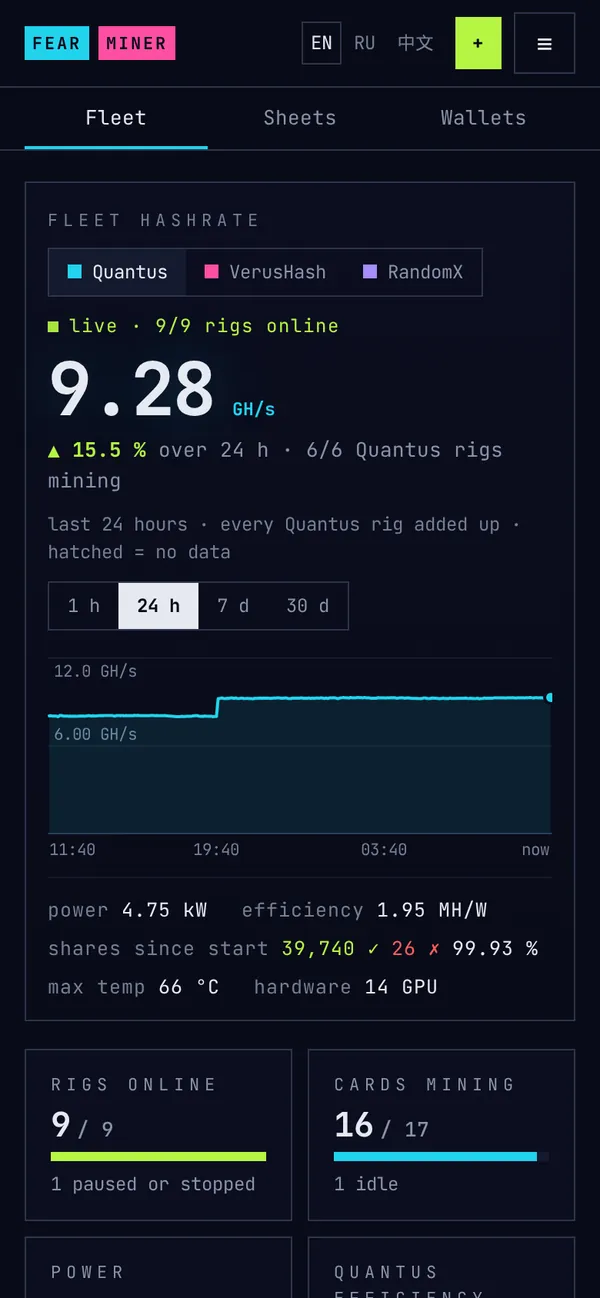
See every rig. Act from anywhere.
Open your cockpit on a phone or PC to check mining and control your rigs.
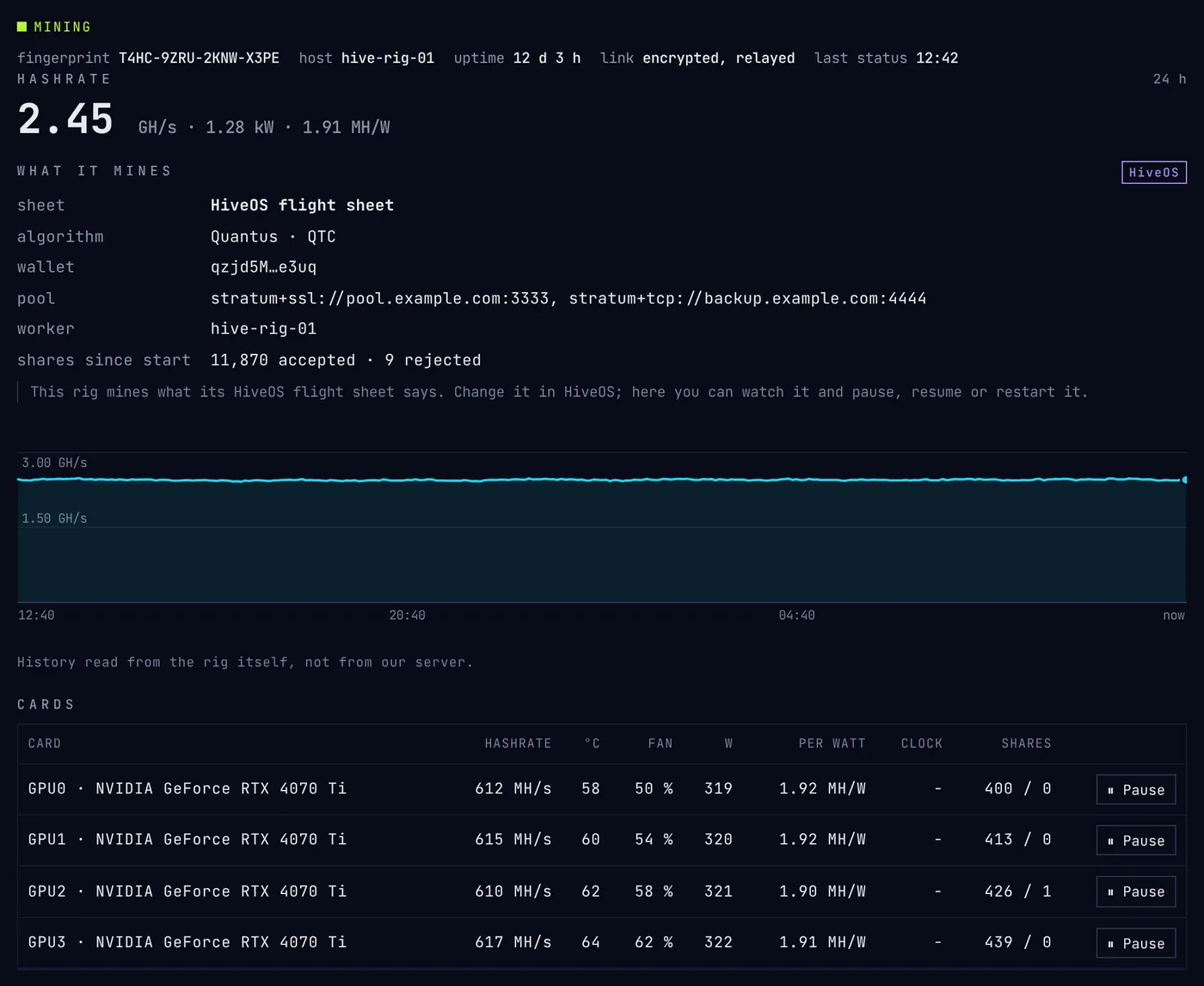
Check each rig
See mining speed, status and history. View temperature, fan and power readings where the hardware supports them.
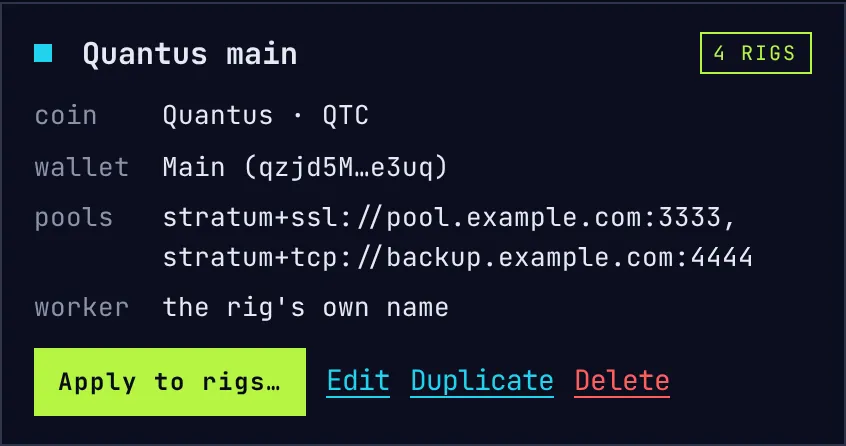
Set up mining once
Save the coin, wallet address and pools in a mining sheet. Apply it to one rig or several.
On HiveOS and mmpOS, the flight sheet or miner profile controls what the rig mines.
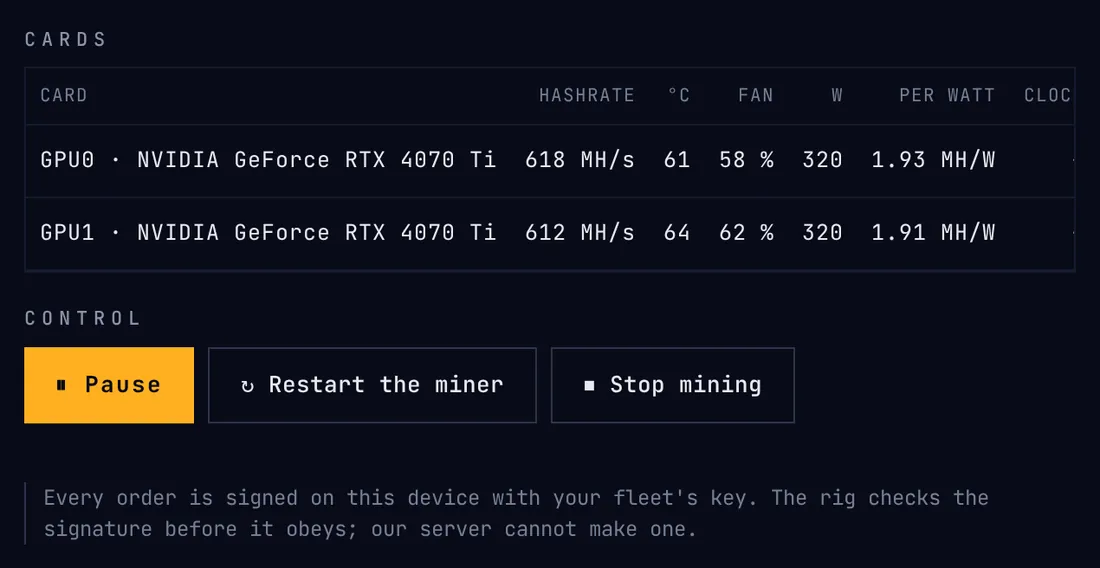
Pause, resume, restart
Control one rig or a selection. Each rig reports whether the command succeeded.
Update 3 rigs to FearMiner 1.24.0?×
What happensEach rig downloads FearMiner 1.24.0, checks its signature against the release key, installs it and restarts: about a minute without mining. If the new version does not come up, the previous one comes back by itself.
2 HiveOS rigs are left as they are: HiveOS updates their miner.
2 rigs need the install line run once more before they can update from here (see each rig).
- rack-a4FearMiner 1.23.0 → 1.24.0ready
- nas-cpuFearMiner 1.23.0 → 1.24.0ready
- lab-rxFearMiner 1.23.0 → 1.24.0ready
Update 3 rigsCancel
Update Linux rigs
Update eligible Linux services from the cockpit. Each rig checks the release signature and restores the previous version if the new one fails to start.
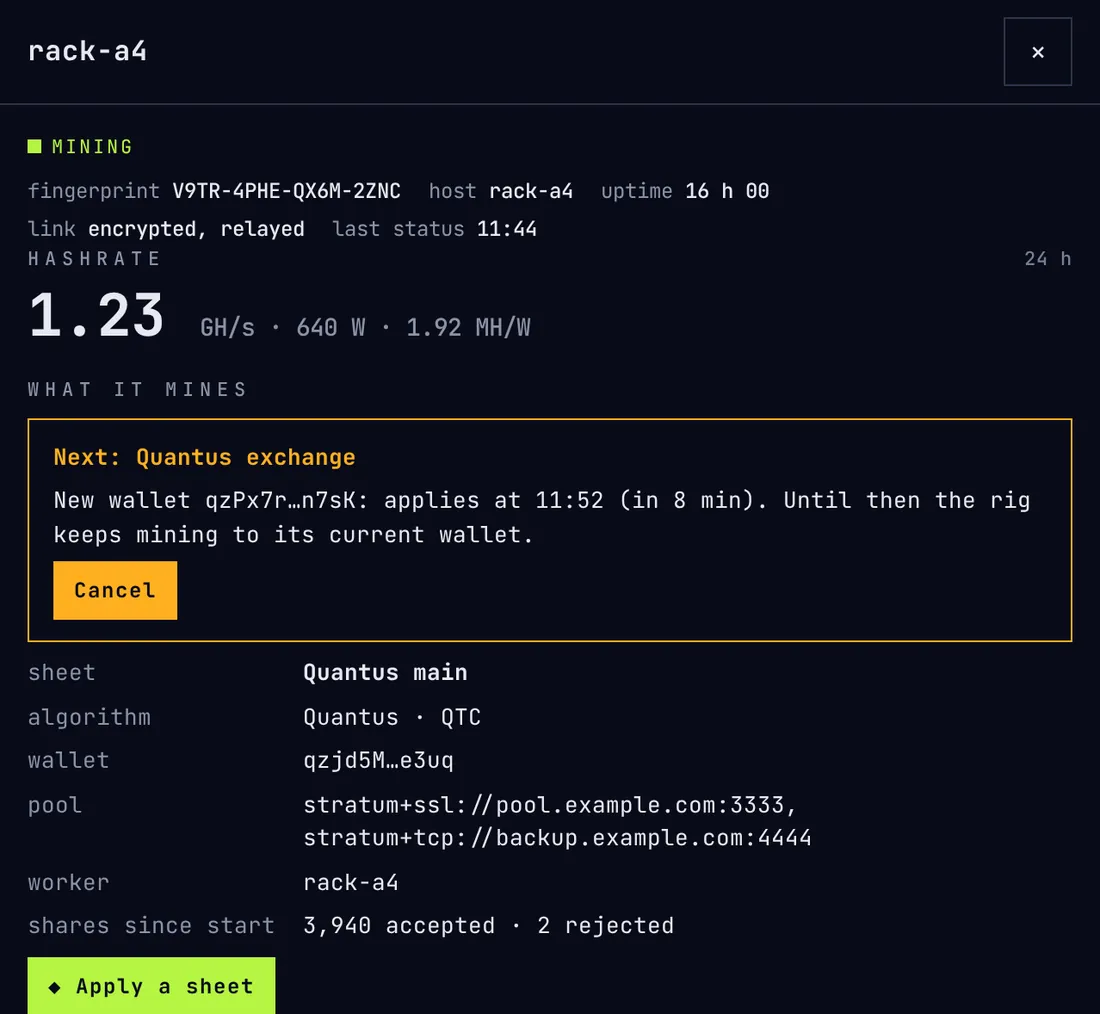
Review wallet changes
Set a notice on a rig and a new wallet waits before taking effect. Cancel a pending change from the cockpit or the rig.
Open cockpit ↗app.fearminer.com · free · no account · phone or PC
Command line
Run it from the command line
Start the miner in a terminal with your wallet address and pool.
Example: Pearl
$ fearminer -a pearl -o stratum+ssl://POOL:PORT -u YOUR_WALLET -w rig1
-a pearl- Algorithm: choose one supported by your hardware.
-o POOL:PORT- Pool: stratum+ssl://POOL:PORT, your pool's host and port.
-u YOUR_WALLET- Wallet: use your public receiving address.
-w rig1- Worker: give this rig a name.
first share accepted after 12.3 s
hashrate 261.4 T/s
Example output. An accepted share confirms that the pool accepted your work.
More command-line tools
A configuration file
Save your settings in one file.
$ fearminer config example > fearminer.toml
$ fearminer --config fearminer.toml --dry-run
[pool]
user = "qzjd5MS1GSCpXLYp8DjZASifnkgtUpx5WwhmEzW3ppHdDe3uq"
worker = "${HOSTNAME}"
Hot reload
Apply supported setting changes while mining.
$ fearminer --config fearminer.toml --watch-config
$ kill -HUP $(pidof fearminer)
Hooks
Run your own scripts when events occur.
$ fearminer -o … -u WALLET --hook temp-high:/opt/rig/hot.sh --hook device-lost:/opt/rig/lost.shA local API
Read status and control the miner with your own tools.
$ curl http://127.0.0.1:4300/api/v1/summary
$ curl http://127.0.0.1:4300/hive-stats
$ fearminer token show
Background service
Keep the miner running as a service.
$ fearminer service install -o stratum+ssl://POOL:PORT -u WALLET -w rig1
$ fearminer service status
$ fearminer service logs
Connect a cockpit later
Enroll an installed miner when you want remote access.
$ fearminer enroll fm1_…
$ fearminer remote off
What the relay sees
Your cockpit data stays encrypted
End-to-end encryption protects messages between your browser and your rigs.
your rigobeys your fleet key only
one connection out, port 443
relay.fearminer.compasses sealed messages
sealed end to end
your browserholds the fleet key
The relay can see
Connection metadata, including IP addresses, timing and traffic size.
Rig identifiers, public keys, enrollment records, software versions and last contact.
What the relay cannot read
The rig names, wallet addresses, pools, hashrates and hardware details inside encrypted cockpit messages.
It cannot sign commands or add a valid rig to your fleet.
Mining does not depend on the cockpit
If the relay goes offline, your rigs keep mining while they try to reconnect.
Remote connection interrupted
The remote view and controls wait. Mining continues.
FearMiner servers unavailable
The miner can use verified fee terms and engines already available on the rig.
Your data stays with you
Mining history stays on the rigs. Your device also keeps your cockpit lists.
Mining still needs a connection to your pool.
What it costs
Free cockpit. A mining fee per algorithm.
No subscription and no charge per rig.
Cockpit
Free to useOn your phone or PC.
Miner
As many rigs as you needRun the miner on one computer or a whole fleet.
Fee
A share of mining timeThe rate is shown beside each algorithm. Never more than 5 %.
A 1 % fee uses about 14 minutes of mining time a day. The miner logs each fee round.
Estimate what your rig could earn
Compare coins using network figures, prices and your electricity cost.
Your hardwareElectricity costEstimated result
Estimates change as prices, network conditions and your mining speed change.
Open the calculatorQuestions
Questions before you start
Short answers, with setup details when you need them.
Do I need to reinstall my operating system?
No. FearMiner runs on supported Linux, Windows and Apple silicon Macs. HiveOS and mmpOS use custom-miner packages.
Can I inspect the installer first?
Yes. Read the script before running it, or download and verify the files yourself. The docs explain the checks used on each platform.
Can I mine without the cockpit?
Yes. Run FearMiner in a terminal with your wallet address and pool. You can connect a cockpit later.
Is the cockpit free? Do I need an account?
The cockpit is free. No email or password is required. Save the 12 recovery words when you create it.
What can the relay see?
Connection metadata and the records needed to connect your rigs. It cannot read encrypted cockpit messages or sign your commands.
Can the relay change my wallet?
It cannot create a valid signed wallet change. A rig can also make wallet changes wait a notice you choose, cancellable meanwhile.
What if FearMiner's services go offline?
Your rigs can keep mining using locally available engines and fee terms. They still need a connection to the pool.
What if I lose the 12 recovery words?
FearMiner cannot recover them. An already-open cockpit can keep working, and your rigs keep mining. Save the words when you create the cockpit.
Which rigs can update from the cockpit?
Eligible Linux services. HiveOS manages its own updates. mmpOS needs the new package URL. On Windows and macOS, run the installer again.
Can HiveOS and mmpOS rigs join my cockpit?
Yes. Add the enrollment argument to the custom-miner settings. The mining OS still chooses what to mine. mmpOS support is beta and has not been tested on a real rig.
How is the mining fee taken?
Through separate one-minute fee rounds. The algorithm list shows the rate, and the log shows each round.
What telemetry does the miner send?
Anonymous usage reports include hardware details, a hashrate range, a random installation ID and the first pool's hostname. Inspect them with fearminer telemetry show, or disable them with --no-telemetry.
Will my hardware work?
Support depends on the algorithm, operating system and hardware. Check the requirements before installing.
Why does Windows or macOS warn about the download?
The binaries are not yet signed for those operating systems. Release files have a separate signature you can verify. Follow the platform-specific verification instructions in the docs.
Start with one rig
Create your cockpit, connect your computer and choose what to mine.
Example setup
garage-rig
✓ Mining started
Quantus · 1.23 GH/s